Late-Night Viewing: Dim Bright Highlights with Eye Comfort Mode
It's late, the lights are off, and you're watching something quiet — a slow documentary, a night scene, a calm talking-head video. Then the cut: a white sky, a ski slope, an interview against a seamless white backdrop. Your screen goes from candle to flashlight, and your eyes file a complaint.
The usual fix — dragging the system brightness down — is the wrong tool. It dims everything, so the next dark scene turns to mud and you're dragging the slider back up. The problem was never the whole picture. It's the bright parts.
What Eye Comfort Mode does
Eye Comfort Mode dims harsh, overly bright video, with an adjustable intensity slider so you decide how much. It's built for long sessions and late-night viewing: the searing highlights come down, the rest of the picture stays watchable, and you stop flinching at scene cuts.
It also isn't a YouTube-only trick. Eye Comfort works across the platforms you watch in Mira — the same slider applies whether tonight's viewing is YouTube, a streaming service, or a site you added yourself. That makes it one of the few comfort settings you can set once and trust everywhere, instead of hunting through each service's player for a brightness option that usually isn't there.
Turning it on
- On Mac, tap the sun icon in the toolbar, then adjust the intensity slider to taste. On iPad, the same sun icon in the toolbar turns it on — adjust the intensity in Settings → General.
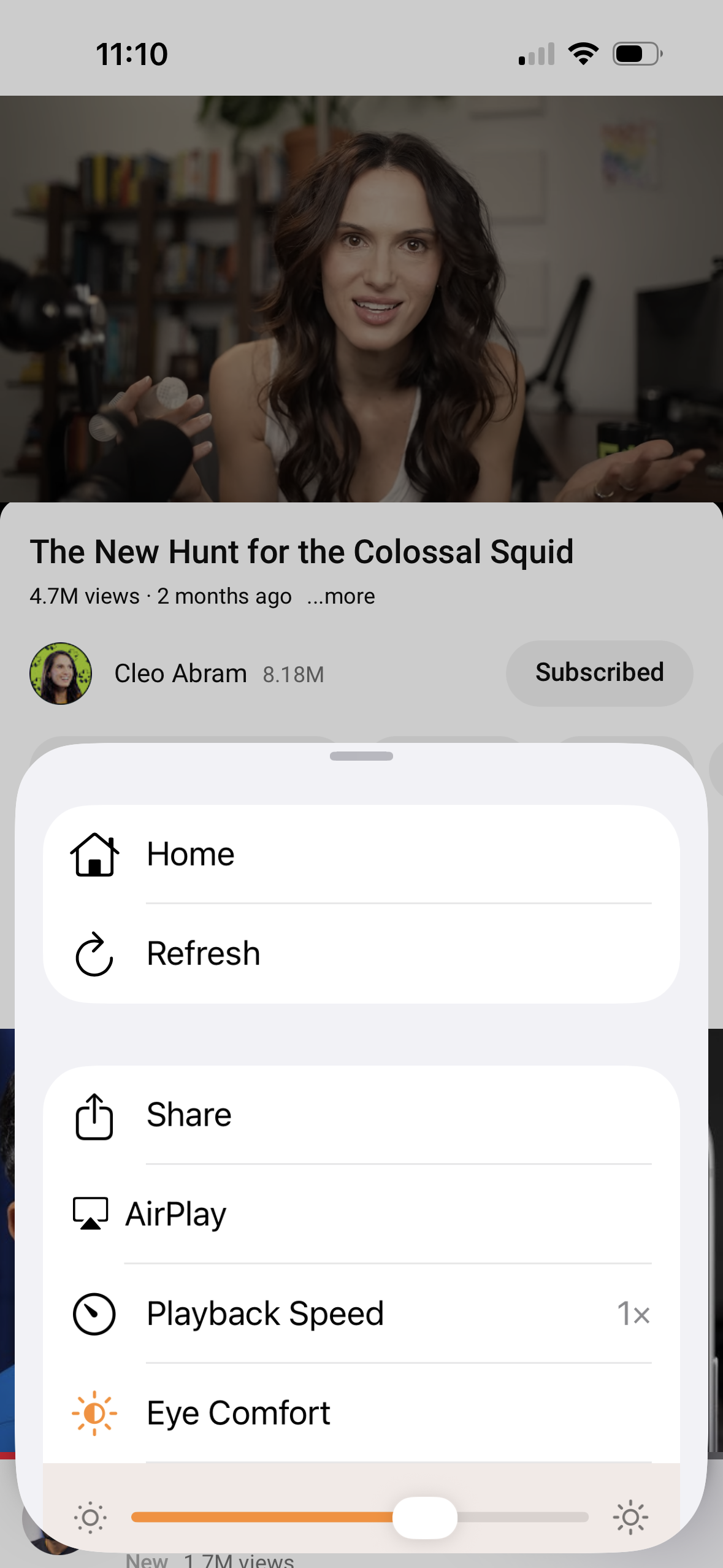
- On iPhone, open the tool menu (the floating eye button) and tap Eye Comfort Mode.
- You can also set it under Settings → General → Eye Comfort Mode.
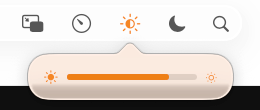
The slider is the point. A gentle setting takes the edge off bright scenes without changing the feel of the video; a heavier setting is for the truly dark room at 1 a.m. Because it's a slider rather than an on/off switch, you can match it to the room you're actually in — a little for a lamp-lit evening, more as the night goes on — and adjust it mid-video without stopping anything.
Eye Comfort vs. dark mode
These two solve different problems, and it's worth knowing which is which.
Dark mode is about the page around the video — menus, backgrounds, panels that would otherwise be white. Mira handles that automatically by following your device's appearance, so pages feel natural day and night with nothing to set; dark mode everywhere covers how that works.
Eye Comfort Mode is about the video itself. A bright scene is exactly as bright in dark mode as in light mode — your system theme can't reach inside the picture. Eye Comfort can: it dims the harsh highlights in the content you're actually watching. At night, the two together are the complete answer — dark page, gentled picture.
When to reach for it
The obvious case is the dark room: in bed, on the couch after everyone's asleep, on a night flight. But it also earns its keep in long daytime sessions — hours of screen-bright video is tiring even at noon — and any time you're watching next to someone who's sleeping and your screen keeps lighting up the room like weather.
Some kinds of content benefit more than others. Talking-head videos shot against white walls, screen recordings of white-background apps and documents, daytime vlogs, sports on bright fields — these spend most of their runtime near the top of your screen's brightness range, and they're exactly what the slider was made for. If you watch mostly on your phone, Eye Comfort is one piece of a larger set of quiet defaults; a calmer way to watch on iPhone tours the rest.
Things to note
- It's a dimmer, not a colorist. Eye Comfort trades some punch in bright scenes for comfort. If a video's look really matters to you in the moment, ease the slider back.
- It doesn't warm the colors. Shifting color temperature for the evening is what your device's Night Shift is for — the two work fine together, but they do different jobs.
- It lives in Mira. The dimming applies to what you watch in Mira; it won't soften other apps or the rest of your screen.
Mira is a native video player for iPhone, iPad, Mac, and Apple TV that skips sponsors, intros, and other unwanted segments — with searchable transcripts, AI summaries, and synced watch parties.