What Is SponsorBlock? Community Segment Skipping, Explained
Every YouTube regular knows the moves: thumb hovering over the timeline, tapping ahead in five-second hops, trying to find the exact moment the sponsor read ends and the actual video resumes. Overshoot, rewind, overshoot again. SponsorBlock is a community project built on a simple observation — somebody has usually already done this dance, so why should the next person have to repeat it?
The idea in one sentence
Viewers mark the exact start and end of the parts people tend to skip — sponsor reads, intros, outros, recaps — and everyone who watches the video after them gets those segments skipped automatically.
That's the whole trick. A video player can't tell on its own where a sponsor read begins; to the software it's all just video. But a person can tell instantly. SponsorBlock turns that one person's thirty seconds of effort into a permanent timestamp that benefits every later viewer.
How the data flows
When a contributor finds an unmarked segment, they note where it starts, where it ends, and what kind of segment it is. That submission goes into SponsorBlock's shared public database, filed under the video's ID.
When you play that video in an app that supports SponsorBlock, the app asks the database whether anyone has marked segments for it. If they have, the player knows in advance that, say, 2:14 to 3:42 is a sponsor read — and when playback reaches 2:14, it jumps to 3:42. No analysis of the video itself, no guesswork. Just shared human knowledge, applied automatically.
Why the data tends to be reliable
Human-submitted data raises a fair question: what stops a bad or sloppy submission from ruining everyone's playback? A few things work in SponsorBlock's favor:
- Many eyes. Popular videos get watched by many contributors, and other viewers can vote on segments — so inaccurate or mischievous ones can be corrected or voted down.
- Precision is the culture. Contributors mark boundaries by hand with care, so segments tend to land right at the real boundary.
- Categories keep it honest. Submissions are sorted by category — sponsor reads, intros, outros, self-promotion, and more — so a viewer who only wants sponsor reads skipped never loses anything else. Our guide to the SponsorBlock categories walks through what each one covers and which are worth turning on.
How Mira builds it in
SponsorBlock began as a browser extension, which leaves out anyone watching outside a browser — including in the official YouTube app. Mira builds SponsorBlock into its player, so there's nothing to install and nothing to maintain:
- A toggle, not an extension. Turn it on in Settings → General → SponsorBlock (it's also offered during first-launch setup, pre-selected with recommended options), then pick the categories you want skipped.
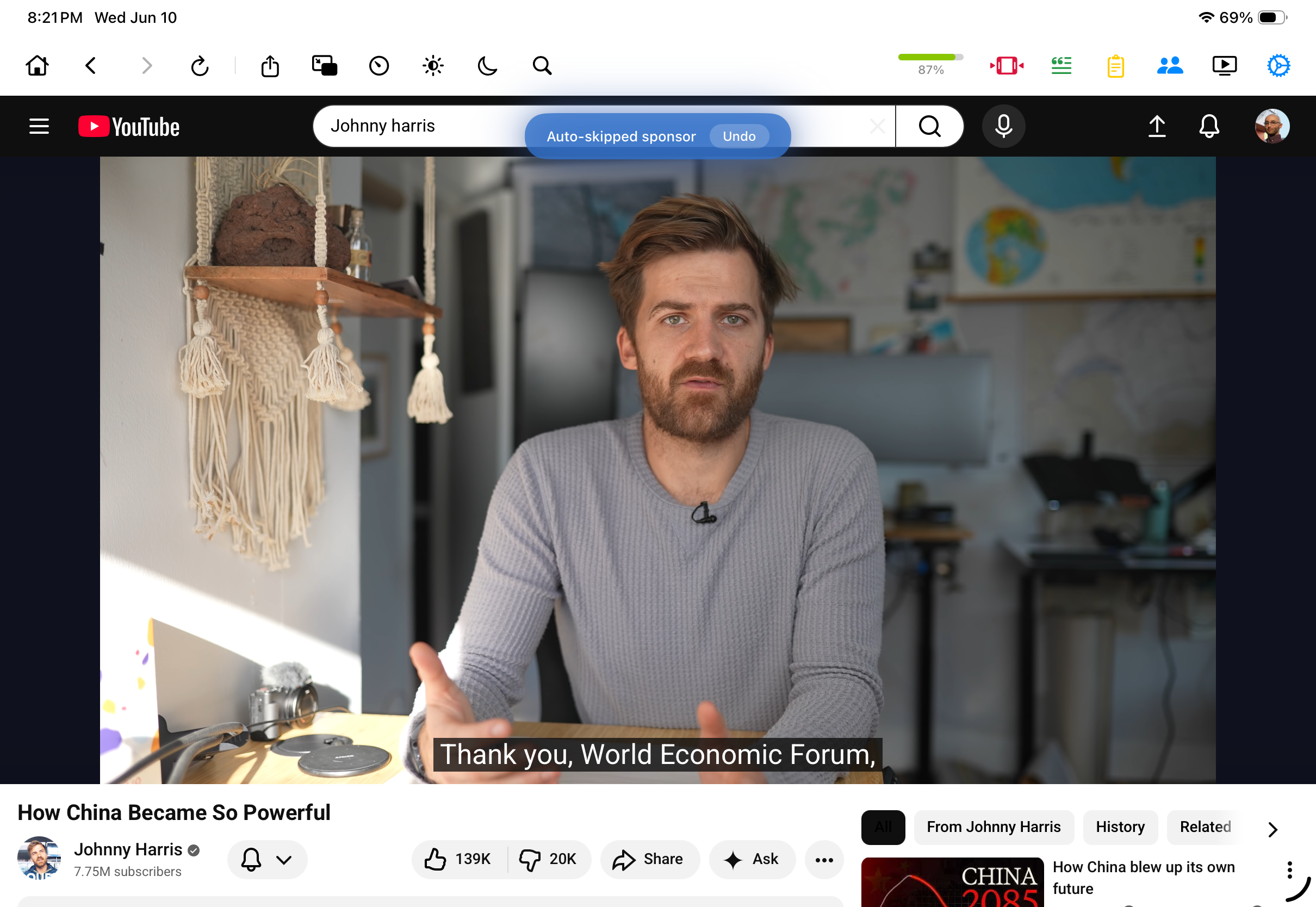
- Visible skips with an exit. When a segment is skipped, a small toast tells you what happened — and an Undo button jumps back if you wanted to see it.
- Color-coded timeline. Optionally enable Color-Code by Category to see each segment type in its own color on the progress bar before it's skipped.
- Contributing built in. You can mark and submit new segments from inside the player, so the data keeps improving for everyone.
Where you can use it
Mira is one universal app, so the same SponsorBlock support travels with you. We have device-specific walkthroughs for SponsorBlock on the Mac and for SponsorBlock on iPhone and iPad — the setup takes about a minute on any of them.
Things to note
- YouTube only. SponsorBlock's database is organized around YouTube videos; it doesn't cover other sites you watch in Mira.
- Coverage follows popularity. Popular videos tend to be marked quickly; a small channel's videos may have no segments at all until someone contributes them.
- It reflects human judgment. Where a sponsor read "really" ends can be debatable, and occasionally a skip lands a beat early or late — which is why Mira pairs every skip with an Undo button.
Mira is a native video player for iPhone, iPad, Mac, and Apple TV that skips sponsors, intros, and other unwanted segments — with searchable transcripts, AI summaries, and synced watch parties.