Making YouTube Feel Right on iPad
The iPad is arguably the best video hardware Apple makes: a big, bright screen with real speakers, light enough to hold in bed, easy to prop in the kitchen, natural to pass around a couch. YouTube's own iPad app is familiar and capable, and this post isn't a case against it. It's about a different way to watch — calmer, arranged around the video instead of the feed — and how Mira builds that on the iPad specifically, where the hardware gives those ideas the most room to work.
A toolbar that sits where your hand is
Mira keeps its controls in a single toolbar — home, back and forward, playback speed, Focus Mode, Transcript & AI, Watch Together, Settings — and on iPad you can place that toolbar on the left, top, or right edge in Settings → General. Hold the iPad in landscape with a thumb along the edge and the controls land exactly where your hand already rests. It's a small thing that you stop noticing precisely because it stops being in the way.

The transcript, docked beside the video
This is where the iPad's screen earns its keep. Open a YouTube video's transcript and it docks beside the video in landscape — below it in portrait — and you can drag to resize the split. Search the transcript for a word, tap a timestamp to jump straight to that moment, or turn on Follow Playback so the text scrolls along as the video plays. Connect your own AI key (Claude, OpenAI, or Grok) and the AI Summary tab adds one-tap actions — key takeaways, an outline, a 15-second summary — plus a chat for follow-up questions. For lectures, interviews, and podcasts, this turns the iPad into something closer to a reading device; we go deeper on that idea in reading YouTube as text.
Skipping what you didn't come for
Mira skips sponsors, intros, and other unwanted segments automatically, using timestamps shared by the SponsorBlock community. You choose which of the eight categories to skip, you can color-code the timeline so each segment type is visible before it arrives, and every skip shows a toast with an Undo in case you actually wanted that part. The full setup is covered step by step in how to use SponsorBlock on iPhone and iPad.
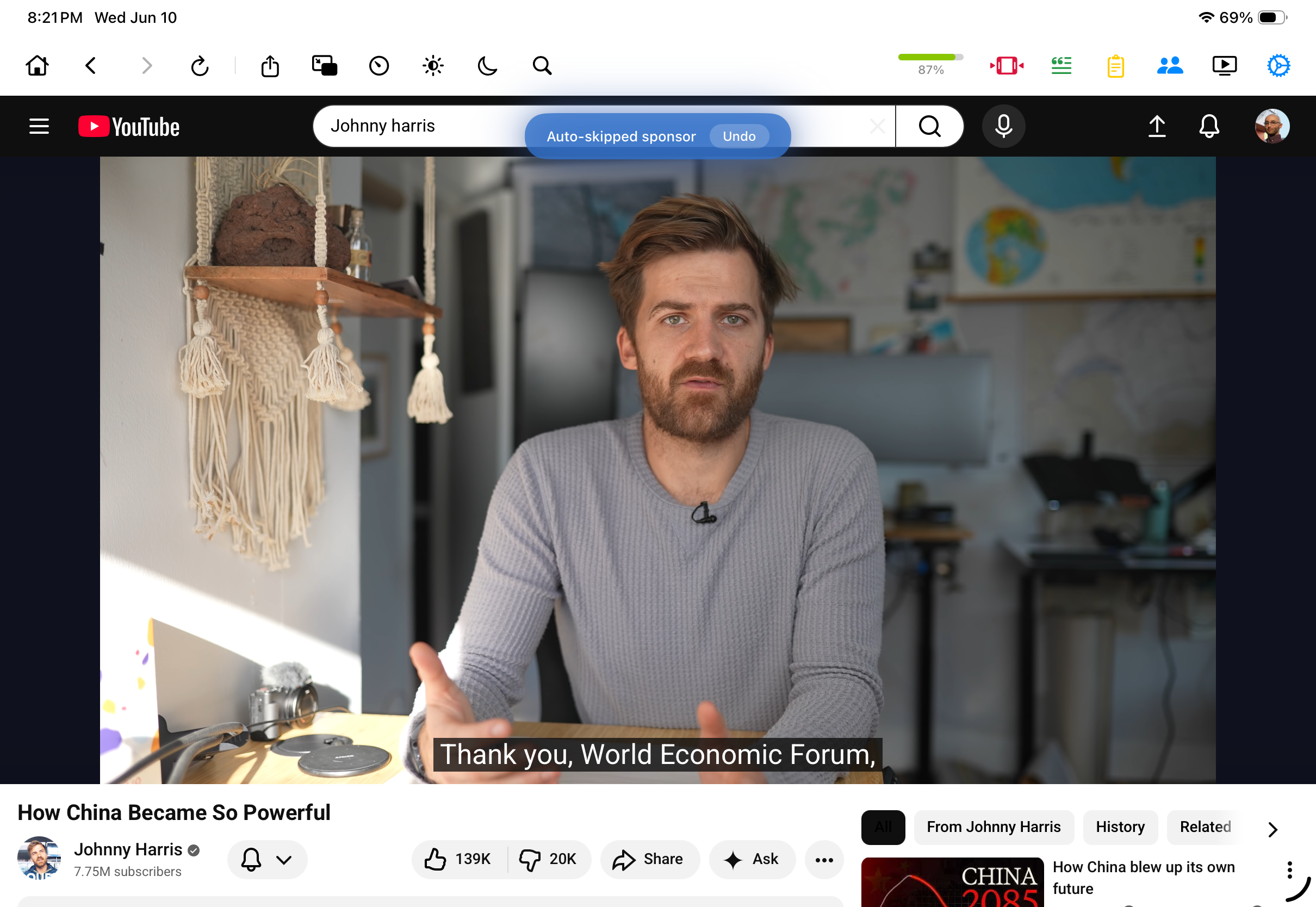
Focus Mode, for when the feed is too loud
Tap the moon icon in the toolbar and YouTube's homepage reduces to a search bar — no recommendations, no feed, just the thing you came to look up. On a video page, the video keeps playing while comments and suggested videos disappear. It's a toggle, so the full site is one tap away whenever you want it back; Focus Mode just makes calm the default rather than something you have to scroll past distractions to find.
Watch parties from the couch
The iPad is the natural device for watching with someone who isn't in the room. Open Watch Together, host a room, and share the 4-character code — up to 10 people stay in sync, with play, pause, and seeking following along for everyone in real time. On iPad the chat can switch to a translucent overlay that floats over the video, so the conversation and the picture share one screen. Playback speed locks to 1× during a session so nobody drifts ahead. There's more on how rooms, host controls, and chat work in watching videos together in sync.
The smaller comforts
A few details that suit the iPad in particular: swipe up on a video to go fullscreen and pinch to crop a wide video edge-to-edge; Picture-in-Picture keeps a video floating while you use other apps; background play keeps YouTube audio going when you switch apps or lock the screen; Eye Comfort Mode dims harsh, bright videos with an adjustable slider for late-night sessions; and AirPlay or Screen Mirroring sends the video to an Apple TV when the couch session graduates to the living-room screen.
Things to note
- The deepest features are YouTube only. SponsorBlock, transcripts, and Focus Mode work on YouTube; other platforms you add get the cross-platform tools like speed, Watch Together, and the watchlist.
- SponsorBlock is community data. Brand-new or niche videos may not have segments marked yet — though you can submit them yourself when that happens.
Mira is a native video player for iPhone, iPad, Mac, and Apple TV that skips sponsors, intros, and other unwanted segments — with searchable transcripts, AI summaries, and synced watch parties.